
Welcome to the Backlinks module! This is where you’ll monitor the heartbeat of your off-page SEO strategy.
When you land on this page, you aren’t just looking at a list of links; you are looking at the authority and health of your project. Let me walk you through the main blocks so you know exactly what you are looking at.
1. Domain Rank (DR) #
First things first: Your authority score.
At the very top, you’ll see your Domain Rank. This is a metric (scored from 0 to 100) that predicts how authoritative your site is based on your backlink profile. The higher, the better!
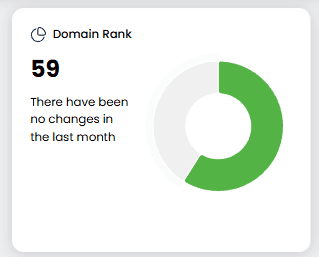
We update this score monthly, so you can easily see if your authority is trending up or down compared to last month.
2. Project Summary #
Right next to your DR, you have your quick-glance panel. This is divided into 4 sub-panels to give you an instant health check of your project:
- Number of Backlinks: The sheer volume of links pointing to you.
- Pages: Number of different pages that are linking to the project.
- Referring Domains: The number of unique websites linking to you (quality over quantity!).
- Unique IPs: Number of different IPs that are linking to the project.

3. Evolution Graph #
Below the numbers, we have the visual timeline. This graph shows the history of your project over time. It’s perfect for spotting trends—like a sudden spike in links (maybe a viral post?) or a drop (maybe a broken page?).
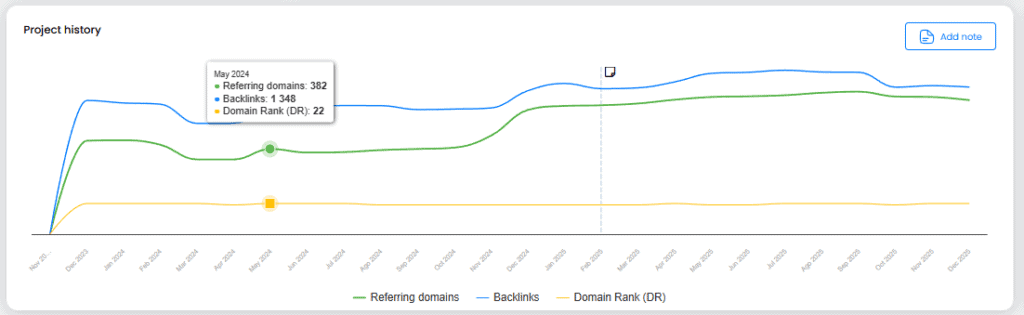
💡 Pro Tip: See that little option to “Add Note”? Use it! If you launch a PR campaign or fix a technical issue today, add a note on the graph. In 6 months, you’ll thank yourself when you can correlate that spike in authority with the exact action you took.
4. Competitors Overview #
Finally, before we get to the main table, we have the Competitors block. Here, we display the rivals you’ve added to your project along with a summary of their backlink stats.
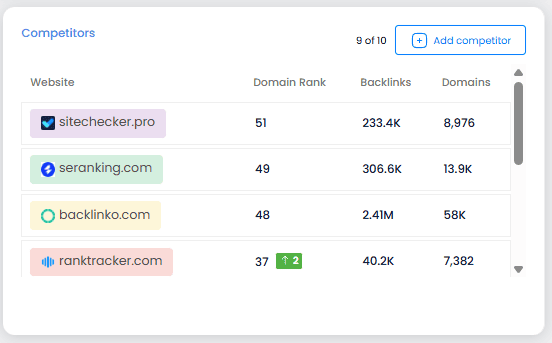
It’s a great way to see how you stack up against them at a glance. And here is the cool part: if you click on any competitor’s name, you will jump straight to a dashboard just like this one, but populated with their data. It’s the perfect way to spy on their strategy!
Ready to dig into the details? Scroll down to the main table, and check out the next article where I explain how to fill it with data.