The Link Intersection Tool
Find easy link-building wins. Discover which domains link to your competitors but not to you using the Intersection Tool and replicate their strategy.
Updated on
This is, hands down, the most powerful strategy for finding actionable link-building opportunities within TrueRanker.
The logic is simple but brilliant: If a website links to Competitor A and Competitor B, but not to you, that website is a prime target. Why? Because they have already proven two things:
- They write about your niche.
- They are willing to link to sites like yours.
In TrueRanker, we automate this analysis for you directly in the Competitor Comparison dashboard.
How to access the Intersection Data
- Go to the Competitor Comparison page (as explained in the previous article).
- Scroll down to the very bottom block: The Details Table.
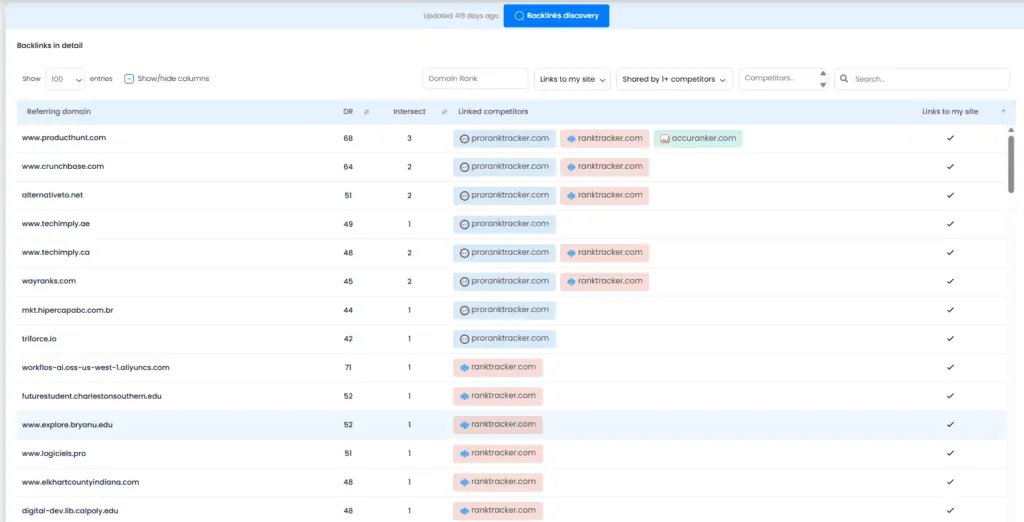
This table is your “Hit List.”
- The Rows: Each row is a referring domain (a unique website).
- The Columns: You will see a column for your domain and columns for each of your competitors.
- The Goal: Look for rows where your competitors have a colored number or checkmark (indicating they have backlinks), but your column is empty or shows “0”.
Digging Deeper
Found a promising domain? Click on the row.
We will expand the details to show you exactly which pages on that domain are linking to your competitors.
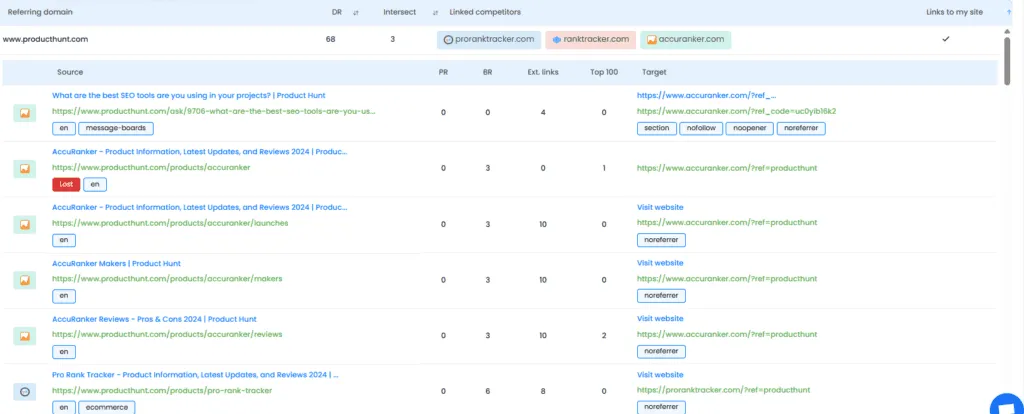
Now you can see the context. Did they link to a blog post? A resource page? A comparison article? Use this intel to reach out to that webmaster and pitch your site as a valuable addition to their content.