What Is llms.txt? What the Data Says and Whether You Actually Need One
What is llms.txt, what does the data say about it, and do you actually need one? A practical guide for SEOs — no hype, just evidence.

“Should we add llms.txt?” is probably sitting unresolved on your SEO backlog right now.
I know because I see it in every GEO conversation I have. Someone reads a LinkedIn post, flags it to the team, and then nobody knows whether to spend two hours on it or move on.
Here’s my honest take after reading the three independent studies that have actually measured it: the answer is more interesting than “yes” or “no.” Let me walk you through what the file does, what the data says, and when it makes sense to add one — or skip it entirely.
What llms.txt is (and the problem it’s trying to solve)
llms.txt is a proposed Markdown file that lives at the root of your website — typically at example.com/llms.txt. Jeremy Howard of Answer.AI introduced the format in 2024. The idea is simple: instead of forcing an AI crawler to figure out your site structure on its own, you hand it a curated list of your most important pages.
The problem it’s solving is real. Modern websites are noisy for language models. A typical page packs navigation, cookie banners, scripts, ads, and sidebar widgets around the actual content. All of that consumes tokens in an AI’s context window — the limited “working memory” it has while processing your page.
llms.txt cuts through that. It says: here’s what my site is, here are the ten pages that actually matter, here’s a one-line description of each. Clean, Markdown-formatted, machine-readable.
That’s also what separates it from robots.txt.
llms.txt vs. robots.txt: two different jobs
People confuse these two constantly. They’re not interchangeable.
robots.txt is access control. It tells crawlers which areas of your site they’re allowed to visit. It’s been around since 1994 and every search engine crawler follows it.
llms.txt is context and guidance. It doesn’t grant or block access — it says: “when you visit, pay attention to these pages first.” It’s a suggestion, not a command. Unlike robots.txt, there’s no guarantee any AI system reads it.
| llms.txt | robots.txt | |
|---|---|---|
| Purpose | Guidance and context | Access control |
| Audience | LLMs, AI agents | Search engine crawlers |
| Format | Markdown | Plain text |
| Compliance | Optional, no standard | Industry standard |
| SEO impact | None confirmed | Direct (crawl budget, indexing) |
Think of robots.txt as the security guard at the door and llms.txt as the VIP concierge who explains the building once someone’s already inside.
llms.txt vs. llms-full.txt: which one should you publish?
The spec defines two variants:
llms.txt is a table of contents. It contains links to your most important pages with brief descriptions. The AI has to follow those links to get the actual content.
llms-full.txt is the full compendium. It bundles the complete text of your most important pages into one file — no subsequent crawling needed. This is useful for RAG (Retrieval-Augmented Generation) systems and for coding agents like Cursor or Cline that load context directly.
For most SEO-focused sites, llms.txt is enough. llms-full.txt makes sense if you run developer documentation or your audience uses AI coding tools to interact with your product.
What the data actually says about llms.txt
I’ll be direct: the evidence so far says it doesn’t move AI citations.
The clearest evidence comes from SE Ranking’s analysis: they trained an XGBoost model across nearly 300,000 domains to evaluate what predicts AI citations. When they removed the llms.txt variable, the model’s accuracy actually improved. The file wasn’t providing signal — it was adding noise.
Other independent analyses on adoption and crawling arrive at the exact same conclusion.
Adoption numbers: how many sites have one?
It depends on which slice of the web you measure. In SE Ranking’s study of nearly 300,000 domains (November 2025), only 10.13% had an llms.txt file — meaning nine out of ten didn’t.
Other studies found similar ranges:
- Trakkr: 13.3% of 37,894 AI-cited domains (March 2026)
- Casey Burridge using HTTP Archive data: 5.61% of top-10,000 websites (June 2026)
- Semrush tracked growth from 951 domains in July 2025 to 16,670 by September 2026
The growth curve is real. But 16,670 domains out of hundreds of millions of active websites is still a thin slice.
One nuance: some of that adoption isn’t intentional. CMSs like Wix, platforms like Mintlify and GitBook, and plugins like Yoast SEO generate the file automatically. An llms.txt on a domain doesn’t necessarily mean someone made a deliberate decision to have one.
Why Google and Chrome send opposite signals
In May 2026, Chrome’s Lighthouse tool (version 13.3) added an llms.txt check to a new category called “Agentic Browsing.” By version 13.5 (September 2026), it became part of an “Agent Resource Discovery” audit group.
Ten days after Lighthouse 13.3 shipped, Google Search Central published its official guidance: Google Search does not use llms.txt, and creating one will neither help nor hurt visibility in Search or its AI features.
So Chrome checks whether the file exists. Google Search says it doesn’t use it. Both statements are true — they’re talking about different systems. Chrome is thinking about how browser-based AI agents navigate sites; Search Central is talking about how Google retrieves and ranks content.
Don’t interpret the Lighthouse check as evidence that Google’s crawlers read your file for citations.
Do ChatGPT, Claude and Gemini actually read yours?
Nobody outside those companies can confirm this.
What we do know: OpenAI, Anthropic, and Google all publish their own llms.txt files for their developer documentation. That shows they see value in the format. But publishing one is very different from reading third-party files as a citation signal.
None of the major AI platforms has publicly confirmed that llms.txt influences which websites they retrieve or mention in answers. The clearest documented use case is coding agents — tools like Cursor and Cline that read an llms.txt when you hand it to them as context via @Docs or an MCP server.
How to create an llms.txt file (step by step)
If you decide to add one, it takes under 30 minutes. The format follows the official v2 spec, last updated in August 2026.
The structure is Markdown:
# Your Site or Product Name
> A one-sentence description of what your site covers.

## Core pages
- [Product page](https://example.com/product/): What your main product does
- [Pricing](https://example.com/pricing/): Plans and pricing overview

## Key articles
- [Guide title](https://example.com/blog/guide/): What it covers in one line

## Optional
- [Older resource](https://example.com/resource/): Lower-priority context
The ## Optional section is for content an AI agent can skip when it needs a shorter context window.
Method 1: Manual (the gold standard)
Open a plain text editor. Create a file named llms.txt (lowercase). Follow the structure above and upload it to your server’s root directory — the same place your robots.txt lives. Verify it’s accessible at yourdomain.com/llms.txt.
Pick 5–10 pages max. A curated list of your core product pages, your most authoritative blog posts, and your about/contact pages is more useful than an auto-generated dump of 200 URLs.
Method 2: WordPress (Yoast or AIOSEO)
If you’re on WordPress, both Yoast SEO and AIOSEO can generate the file for you. In Yoast: go to Settings → Site features, scroll to the APIs section, and toggle on llms.txt.
The result is automatic but not strategic — it’ll include pages you might not want featured. Treat it as a starting draft, then edit manually.
Method 3: Generators for any CMS
For non-WordPress sites: Mintlify and GitBook generate the file automatically for documentation sites. Firecrawl can draft one from your sitemap for any stack. Same caveat: review the output before publishing.
| Method | Control | Time | Maintenance |
|---|---|---|---|
| Manual | Full | 20–30 min | Manual on each update |
| Yoast / AIOSEO | Low | 2 min | Automatic |
| Generator tools | Medium | 10 min | Manual review |
What an optimal llms.txt looks like in practice
Quality beats quantity. A file with 8 well-described pages is more useful to an AI agent than a list of 150 URLs with no context.
What to include:
- Core product or service pages
- Your most authoritative, evergreen blog posts
- Pricing page
- About page
What to leave out:
- Gated or login-required pages
- Time-sensitive content (event pages, limited promotions)
- Duplicate or near-duplicate pages
- Pages you wouldn’t want an AI to treat as canonical
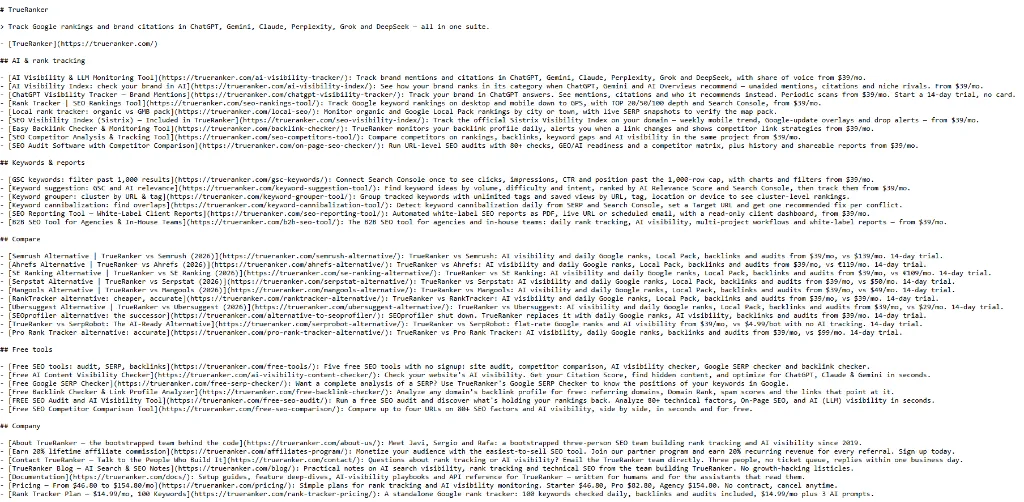
You can inspect the full file and how it is structured in our own llms.txt.
Should you actually add llms.txt to your site?
There’s no universal answer. The right question is: what does it cost you to maintain one?
If your CMS already generates it
Leave it. Platforms like Wix, Mintlify, GitBook, Yoast and AIOSEO create it automatically. If the file exists at no cost to you, keeping it is low-risk and potentially useful as adoption grows. Just make sure it’s accurate — stale URLs pointing AI agents toward content you no longer want featured is the main downside.
If you’d need to build it manually
This is where it gets harder to justify. If creating and maintaining one means auditing your site, curating URLs by hand, writing descriptions, and revisiting the file every time you publish or remove pages — that’s real time for an uncertain return.
There are higher-impact things to focus on first: structured data, internal linking, content clarity, E-E-A-T signals. My GEO guide covers those in detail if you want a starting point.
If you’re targeting a specific AI agent or platform
This is the case where deliberate implementation makes most sense. If your audience uses a specific AI tool — especially for technical documentation or developer workflows — giving that system a clean map of your content might actually help. Coding agents reading your llms.txt via Cursor or Cline is a documented, practical benefit today.
Treat it as an experiment, not a requirement. Which brings me to the part no one else covers.
How to tell if llms.txt is doing anything on your site
Everyone explains what llms.txt is and how to create it. Nobody explains how to measure whether it changes anything. That’s the gap I want to fill here.
Don’t judge it by checking a handful of prompts manually a week after publishing. That tells you nothing — AI results are inherently variable, and one good week is noise.
Start with a baseline before you publish the file.
Track where you currently appear in AI-generated answers: which prompts surface your brand, which AI engines cite you, how often. If you’re already tracking AI visibility in a rank tracker, export that data before making any changes.
If you’re starting from zero on AI visibility tracking, this guide walks through the setup step by step. It’s worth understanding how AI visibility differs from Google rankings before you start running experiments — the metrics don’t move the same way.
Give it 4–6 weeks of stable conditions.
Don’t run a major content push, earn 50 new backlinks, or rewrite your most-cited pages during the test. Isolate the variable as much as you can.
Keep a control group of prompts.
These should be prompts where the URLs in your llms.txt aren’t directly relevant. If your visibility shifts equally across both groups, the file probably isn’t the cause.
A crawler fetching /llms.txt in your server logs proves the file was requested — it doesn’t prove the system used it to choose your page or generate a citation. The outcome that matters is whether your actual AI visibility changes.
That gives you a real before-and-after comparison instead of a guess.
Frequently asked questions
Does llms.txt affect my traditional SEO rankings?
No. The file targets AI crawlers and agents, not traditional search engine crawlers. Googlebot’s log file data shows it doesn’t request llms.txt at all — zero requests in Nathan Hall’s 31-day measurement across seven sites. There are no negative ranking effects from publishing one or from not having one.
How many links should I put in my llms.txt?
Aim for 5–10 strategically selected links. These should represent your core product pages, your most authoritative blog posts, and your about/contact pages. A curated short list is more useful to an AI agent than an auto-generated sitemap dump.
Should I set llms.txt to noindex in Google?
Yes, it’s good practice. The file is an instruction for AI systems, not content you want appearing in Google search results. A noindex directive prevents it from showing up in the index while AI crawlers can still find and read the file — crawling and indexing are separate things.
Can I use llms.txt to block AI training?
No. llms.txt is for guiding AI agents during inference (answering a user’s question), not for controlling training data. If you want to opt out of AI training, use robots.txt with directives like User-agent: GPTBot followed by Disallow: /. That’s the right tool for that job.
Does llms.txt improve citations in ChatGPT or Gemini?
Not demonstrably, based on current evidence. SE Ranking’s analysis of 300,000 domains found no measurable relationship between having an llms.txt and citation frequency. Google’s John Mueller has emphasized on the Search Off the Record podcast that search engines cannot rely on a self-reported file to differentiate websites. The evidence base is still growing — if you implement it, measure it rather than assuming.
What happens if I don’t keep my llms.txt updated?
Stale URLs are the main risk. If your file points AI agents toward pages you’ve removed, restructured, or no longer consider authoritative, you’re directing them toward content that doesn’t represent you well. If you publish one, add a calendar reminder to review it whenever you make significant changes to your site architecture or top-priority content.
Not sure how visible you are in AI search?
Track your AI visibility across ChatGPT, Gemini, and Perplexity and know when something actually moves the needle.
Written by

Javier Quevedo
Co-Founder & CEO, SEO Lead
Javier co-founded TrueRanker and leads the frontend, the public website, and the last mile between a ranking in the database and the screen an SEO actually uses. He has spent years turning GEO, local SEO, on-page work and AI visibility into product — and into the guides on this blog — so agencies can measure ChatGPT citations the same way they already measure Google. He also works the backend: a clean interface over stale data is still a lie.
You might be interested
The AI search optimization checklist I run before I change a page.
This AI search optimization checklist starts with one prompt. I show what to check, how to read a mention versus a citation, and when a change did nothing.
Javier Quevedo10 min read
Read the postAI search ranking factors only count when a citation moves.
AI search ranking factors are why one page gets cited in ChatGPT or Perplexity and another does not. Here is what I check on a single prompt.
Javier Quevedo12 min read
Read the postWhy your Google ranking says nothing about your AI visibility
Ranking #3 on Google does not put you in ChatGPT's answer. Here is why the two came apart, and what to measure instead.
TrueRanker2 min read
Read the postWhat Is AI Brand Monitoring? (And Why It’s Crucial in 2026)
Discover what AI Brand Monitoring is, how it differs from traditional SEO, and how to use TrueRanker to measure your Share of Voice and more.
Javier Quevedo6 min read
Read the postAI Share of Voice: How to Tell if ChatGPT Recommends Your Competitors [2026]
Losing an LLM recommendation means losing a sale. Learn to measure Share of Voice against your rivals and read what ChatGPT says about you.
Javier Quevedo4 min read
Read the postAI Mentions vs Citations: The Key GEO Metric [2026]
Appearing in an AI response is not a binary goal. Learn the difference between a Brand Mention and a Citation, and why you need to measure both.
Javier Quevedo5 min read
Read the post