How to write SEO reports for clients they'll actually read
What belongs in SEO reports for clients, which metrics earn a place, and how to write one, with a real sample of rankings, links and AI visibility.

If you are looking for SEO reports for clients, you don’t want another 20-page PDF nobody opens. You want a monthly document that reads in five minutes and makes it clear whether the work produced the results you expected.
That’s the report I send. I say first whether it worked and what we’ll do next. The charts come after, for anyone who wants the detail.
What an SEO report is
An SEO report covers what happened on a project over a period: what moved, what you did, and what comes next. That includes Google and, if you measure it, AI assistants. It’s not a dump of screenshots.
If the client can’t repeat those three things after they hang up, it isn’t a report. It’s just a file they exported.
A few months ago a client sent me another consultant’s “report”: 18 pages, ten charts, and not one sentence about what they would do next. On the call they asked if their rankings had improved. The PDF didn’t say. I had to open Search Console in front of them to answer.
What belongs in an SEO report, and what does not
An SEO report carries rankings, clicks and impressions if you have Search Console, links, the health of the pages you worked on, and an explanation of the whole picture. What doesn’t belong is a lone metric, an “authority score” with no context, or a screenshot that doesn’t explain the month.
An SEO ranking report with no clicks doesn’t make sense. An SEO audit report with no rankings is a list of warnings. Together they explain what happened that month.
Rankings and visibility in Google
The question I hear in almost every meeting is “Did our rankings improve?”. Answer it with the average position of the keywords that mattered that month, how many sit in the top 10, and which ones dropped.
Don’t dump the project’s 400 keywords if the work that month was the blog. Only include that group.
A mattress retailer walked into the meeting with “traffic is down”. The 12 product keywords were flat or better. What had fallen was a brand query Google Ads had taken. Without that selection, the report would have said SEO was failing.
If you track city and device, those rankings come from the rank tracker. Search Console gives you a historical average, not today’s position in the client’s city.
Clicks and impressions
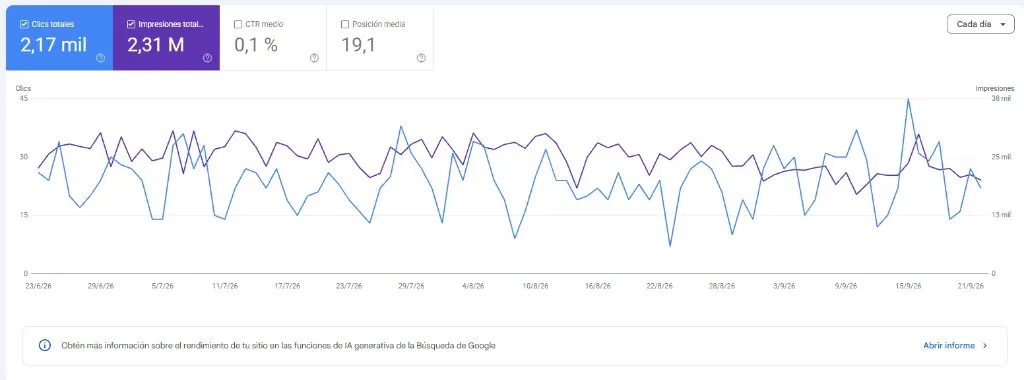
Impressions and clicks are the traffic Google attributes to you. A keyword that rises and wins no clicks is an anecdote. One that drops from position 8 to 12 and loses half its clicks is what the month was about.
Connect Search Console to the project and those two numbers land in the same document as the rankings. If you don’t have it, say so: the ranking report is only half there.
Links
A new link from a trade publication is worth more than twenty directories. In the report I put: how many links you gained, how many links you lost, and one or two worth explaining.
If there was no link building that month, don’t invent a links section. Say there was none and move on to the work you did. Use the backlink monitor so you’re not counting them by hand.
Audits of the pages you worked on
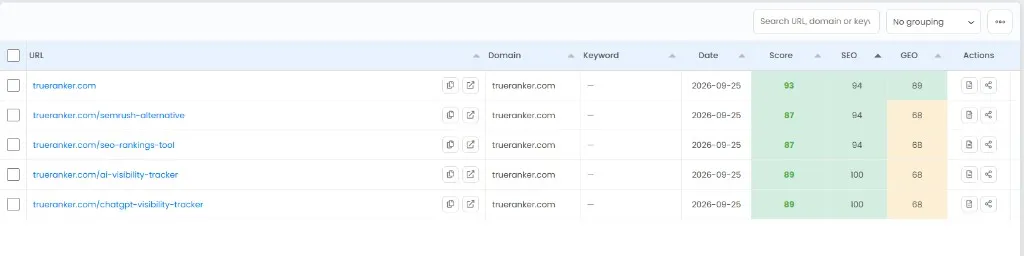
An SEO audit report isn’t a crawl of the whole site. It’s the state of the URLs you worked on: title, indexation, cannibalization, a 404 error that killed a landing page.
If your focus that month was content, don’t open with Core Web Vitals. If it was technical, don’t open with the top 10 keywords. The on-page analysis scores those URLs; you choose which ones go in.
How to make an SEO report for a client
You pick who you are showing it to, you set the period and the keywords, you write what happened and what you will do, and you provide it as a PDF or a link they can reopen. That’s the order. The rest is how you present it.
How to make an SEO report for a client doesn’t start in the tool. It starts in the previous meeting: what you promised, and who you will tell it to.
Who it is for and which period it covers
The business owner wants three figures and the next steps section. The marketing lead wants the breakdown. If you send the same PDF to both, one gets bored and the other doesn’t understand it.
Fix the period before you open anything: the 1st to the last day of the month, or the four weeks you have already closed. Mixing “last 28 days” with “this month” is the fastest way to argue over a number that isn’t even the same figure.
Which keywords go in
Keep the keywords you actually worked on that month. Filter by tag, folder, a URL that contains /blog/, favorites only, or only the ones that rose or fell. A 300-row report doesn’t get read.
On a project for a group of clinics, that month we were working on Seville and Malaga. If I put Madrid in, the client saw a drop that wasn’t their market. Selecting isn’t hiding numbers. It’s keeping two conversations apart.
What you write above the numbers
Three paragraphs are enough: what moved, why (an update, a new article, a link, a cannibalization you fixed) and what you will do next month. Without that explanation, the numbers don’t mean anything.
If the month was bad, say so. A client will forgive a drop you explained. They won’t forgive a PDF that pretends everything is fine.
PDF or link, and how often
The SEO report PDF gets printed, forwarded and filed. The live link opens on a phone in the meeting. I send both when I can: the PDF for the archive and the URL in case someone asks for a number mid-month.
I send it monthly. Weekly only if that week the client has to decide something; otherwise the second PDF is just a repeat of the first. I don’t send a daily one: the project doesn’t move that fast.
A sample SEO report for clients
A sample SEO report I actually send opens with a summary and five blocks: AI visibility, rankings, backlinks, on-page audits and the visibility index. It doesn’t open with a spreadsheet.
The trueranker.com report for August 2 to September 1, 2026 was generated on September 2. In the table of contents, AI visibility comes first. The client already asks whether ChatGPT cites them, and the report has to answer it in the same document as the rankings.
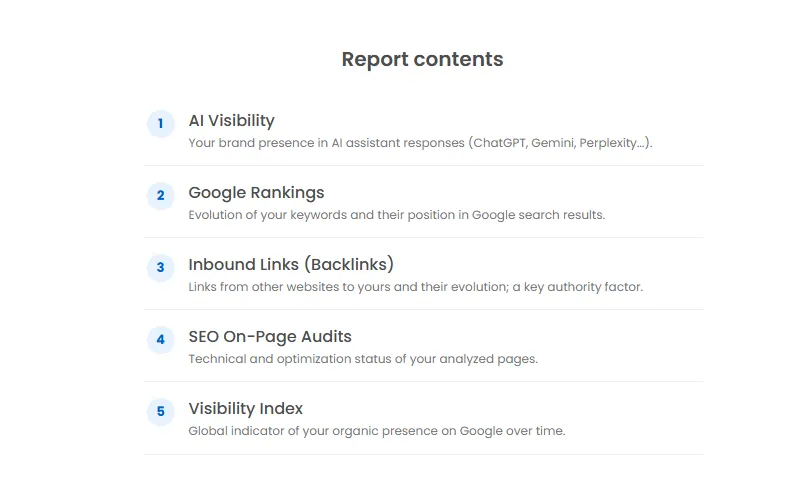
That’s the report the report generator builds. You can turn any section off if that client doesn’t need it.
AI visibility
This block tells you whether ChatGPT, Gemini or Perplexity mentioned you this month, and whether that was more or less than last month. If you don’t measure it, the client asks anyway, with a screenshot of their chat.
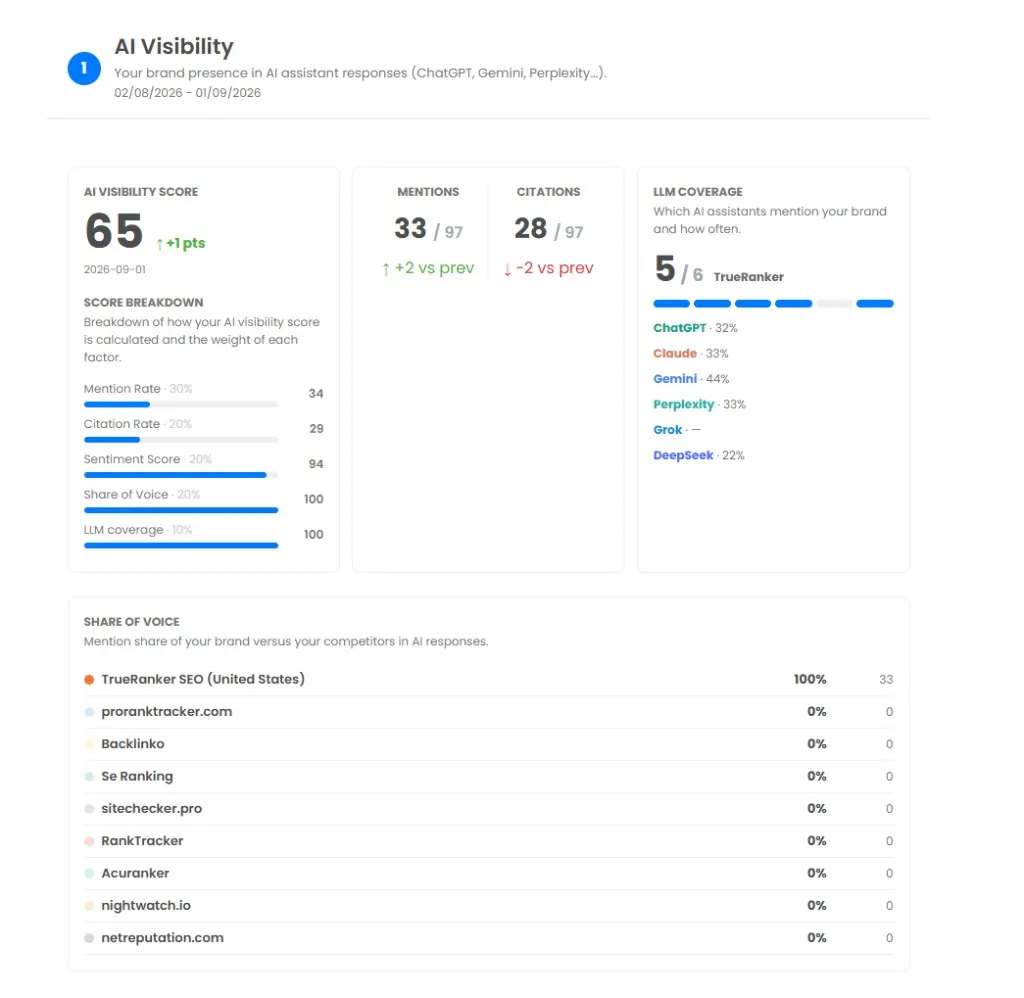
I put it first when the business is already losing clicks to AI answers. If the client still only cares about Google, I move it down or I leave it out. Those mentions come from AI Visibility.
Google rankings
This block shows the selected keyword group: position, whether they rose or fell, volume and URL. On September 2, in that trueranker.com report, this block comes second. It isn’t the whole report.
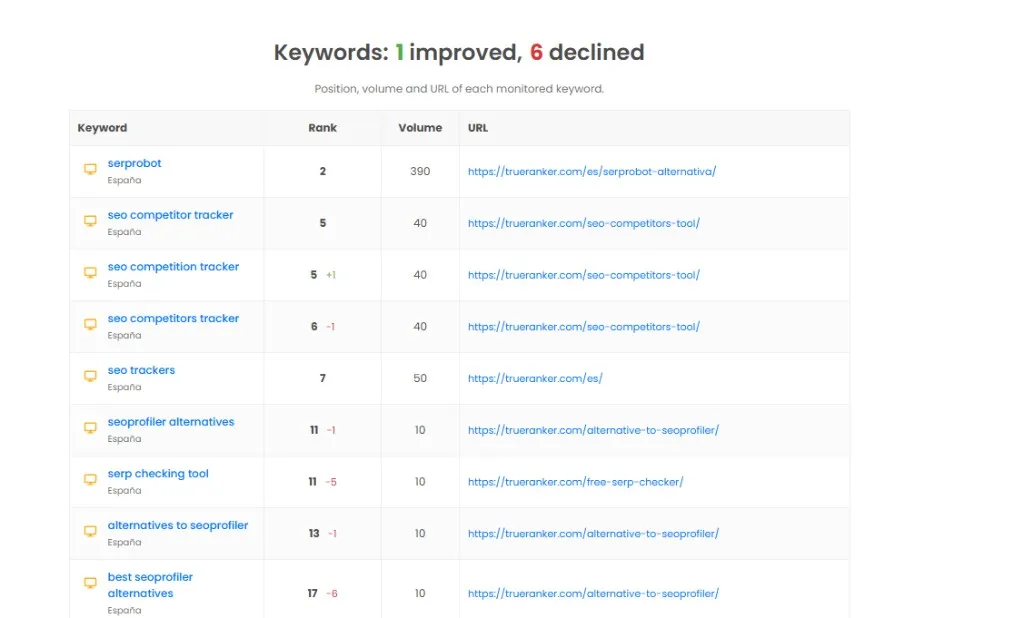
If you worked on a URL that month, filter by that URL. If you skip the filter, the client will see keywords that weren’t part of that month’s work and ask why those keywords moved.
Backlinks, audits and the visibility index
All three sit in the same document: links gained and lost, the on-page score of the URLs you crawl, and the visibility index, which sums up whether the domain is more or less visible in Google than a month ago.
You don’t need a separate report for each. If there were no links that month, leave that section out. If you don’t run audits, leave that one out too. The index makes more sense next to the rankings, not in a one-off email.
Automate that report with TrueRanker
The same report (AI visibility, rankings, backlinks, audits and the visibility index) is generated between two dates, as a PDF or a URL, and it can be scheduled. That’s what I set up in the first month, so I don’t build it by hand again.
One Friday in August I spent the afternoon pasting screenshots for three clients who wanted “the usual report”. On Monday I scheduled the monthly email on the project. The next month the PDF went out on its own, with the agency logo and the keyword set we had agreed.
In Reports you open the project, name the report and pick the sections. You can filter Rank Tracker by device, location, tags or URL, and add up to three competitors in the same document. If Search Console is connected, impressions and clicks land in the PDF. On Pro and Agency, white-label removes the TrueRanker brand: your logo, your sender, your subject. The guide to creating and scheduling the email walks through each field.
You can send it daily, weekly or monthly. You can pause it without deleting the schedule. Every PDF stays in the history, so you can reopen last month’s report without generating it again.
If the client wants the figures between one email and the next, share the live URL or the read-only dashboard. If you want to stop building that PDF by hand, set up the first scheduled email in the SEO reporting tool.
Put the report on a schedule
It includes AI visibility, rankings, links, audits and the visibility index, between two dates, as a PDF or a URL. 14-day trial, no credit card.
Written by

Javier Quevedo
Co-Founder & CEO, SEO Lead
Javier co-founded TrueRanker and leads the frontend, the public website, and the last mile between a ranking in the database and the screen an SEO actually uses. He has spent years turning GEO, local SEO, on-page work and AI visibility into product — and into the guides on this blog — so agencies can measure ChatGPT citations the same way they already measure Google. He also works the backend: a clean interface over stale data is still a lie.
You might be interested
Automated SEO Reporting: Stop Wasting Non-Billable Hours [2026]
Stop wasting non-billable hours. Create automated, white-label SEO reports with custom charts and Google Search Console data using TrueRanker.
Javier Quevedo3 min read
Read the postDiscover the position in Google of your website’s keywords
Check real Google rankings without Incognito guessing: daily tracking and the SERP your customers actually see.
Javier Quevedo4 min read
Read the post