Automated SEO Reporting: Stop Wasting Non-Billable Hours [2026]
Stop wasting non-billable hours. Create automated, white-label SEO reports with custom charts and Google Search Console data using TrueRanker.

It’s the end of the month. If you are an SEO consultant or work at an agency, you know exactly what that means: reporting nightmare.
You start exporting data from different tools, opening endless spreadsheets, trying to cross-reference keyword rankings with actual traffic, and spending hours formatting it so your client can actually understand it.
Those are non-billable hours you are losing instead of doing actual SEO.
And the worst part? Often, the client receives a PDF full of technical numbers they don’t understand, glances at it, and closes it. In this article, we’ll show you how we redesigned TrueRanker’s Reporting module to fix this, automating the process and making it visually compelling.
The Problem with Traditional SEO Reports
When it comes to reporting results, SEO professionals usually fall into two traps:
- Over-engineering (Looker Studio): Building hyper-complex dashboards in Looker Studio can be powerful, but it requires constant maintenance, breaks with API updates, and honestly, overwhelms 90% of local business or SME clients.
- The Ugly Spreadsheet: Sending a raw Excel file exported directly from a generic tool screams unprofessionalism and offers zero brand value.
Clients don’t want to be data analysts. They want to know three things: Am I ranking higher? Am I more visible? Is my site getting more traffic?
The Solution: TrueRanker’s New Reporting Module
We listened to hundreds of agencies searching for “white label seo reporting tools” and “automated seo reports”. We’ve launched a massive update to our report builder to answer this demand.
Now, you can generate executive-grade reports in under 2 minutes. Here are the key upgrades:
1. Native Google Search Console (GSC) Integration
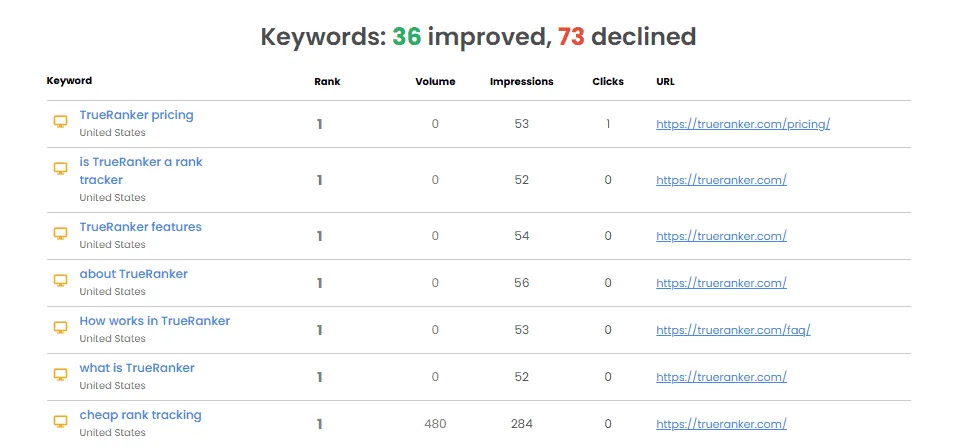
Rankings alone don’t pay the bills. Now, you can connect your Google Search Console account so your reports display positions right next to the actual business impact: Total Impressions and Total Clicks for the period. All in the same clean table.
2. New Visual Data Charts
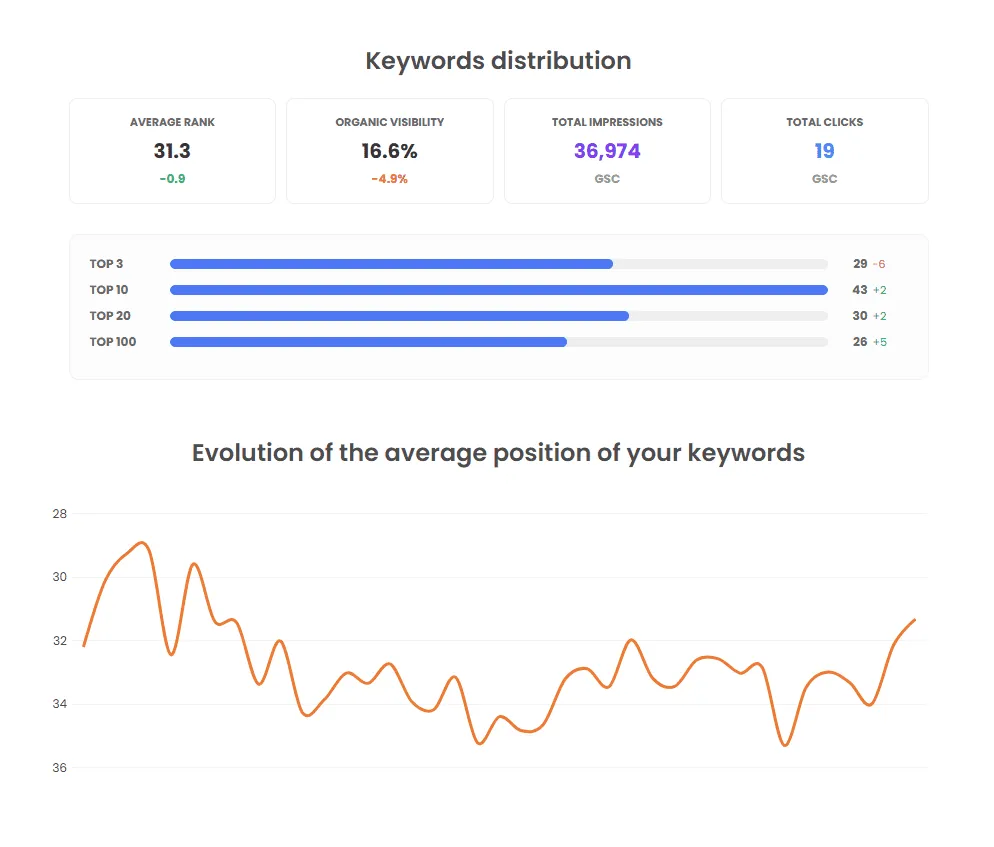
We’ve implemented beautiful charts that make any client understand their progress at a glance.
- Keyword Distribution: Pie and bar charts visually breaking down the percentage of keywords in the coveted TOP 3, TOP 10, or TOP 20 spots.
- Evolution Trends: Line graphs mapping the trajectory of your Organic Visibility and Average Rank over time.
3. 100% White Label
Your clients belong to you. Configure the report to feature your agency’s logo, your corporate colors, and completely remove any trace of TrueRanker. Build trust and reinforce your brand authority with every delivery.
4. Set It and Forget It (Automation)
Why build a report every month when you can schedule it? Set the frequency (weekly, monthly), add your clients’ email addresses, and TrueRanker will automatically send them an updated web link or PDF.
Conclusion: Reclaim Your Time
Creating SEO reports shouldn’t be a part-time job.
Use tools that condense technical data into clear business charts, brand them as your own, and automate the delivery. Your clients will be happier because they finally understand what they are paying for, and you will get your valuable hours back to actually drive better results.
FAQ: Automated SEO Reporting
Can I customize what data my client sees in the report?
Yes. TrueRanker’s report builder is fully modular. You can toggle competitor data on or off, choose to display search volumes, and decide whether to include Impressions and Clicks from your Google Search Console integration.
What export formats are available for the reports?
You can export the report as a clean, ready-to-attach PDF or generate a dynamic Web Link. The web link is perfect for recurring reports and provides a seamless viewing experience for your clients.
Is the white label feature available for freelance consultants?
Absolutely. The white label SEO reporting functionality is designed specifically so independent consultants and agencies can present results under their own brand identity without spending thousands on custom software development.
Tired of building reports manually?
Get your time back. Create your first automated, white-label SEO report with GSC data in under 2 minutes.
Written by

Javier Quevedo
Co-Founder & CEO, SEO Lead
Javier co-founded TrueRanker and leads the frontend, the public website, and the last mile between a ranking in the database and the screen an SEO actually uses. He has spent years turning GEO, local SEO, on-page work and AI visibility into product — and into the guides on this blog — so agencies can measure ChatGPT citations the same way they already measure Google. He also works the backend: a clean interface over stale data is still a lie.
You might be interested
Rank Tracker Not Matching Google? Why Both Numbers Are Real
Rank tracker not matching Google? See the six variables that split the two numbers, why incognito doesn't fix it, and how to check your real position.
Sergio Pérez13 min read
Read the postHow to write SEO reports for clients they'll actually read
What belongs in SEO reports for clients, which metrics earn a place, and how to write one, with a real sample of rankings, links and AI visibility.
Javier Quevedo8 min read
Read the postDiscover the position in Google of your website’s keywords
Check real Google rankings without Incognito guessing: daily tracking and the SERP your customers actually see.
Javier Quevedo4 min read
Read the post