11 Best SEO Chrome Extensions in 2026 (Tested for Speed & Workflow)
Most SEO Chrome extensions bloat your browser. Here are the 11 tools I actually keep pinned for on-page audits, redirects, SERPs, and schema.

If you search for SEO Chrome extensions, you usually get lists of forty plugins that nobody actually keeps installed.
Installing twenty browser extensions turns Google Chrome into a memory hog, slows down page rendering, and causes conflicting scripts that mess with your audits. The reality of daily SEO work is much simpler: you only need one solid tool per job.
A browser extension does not replace a rank tracker, a dedicated backlink index, or a cloud crawler. What a great SEO extension for Chrome actually gives you is instant answers on the tab you are currently looking at: What is the canonical URL? Did the developer break the H1 hierarchy? Is this 301 redirect hopping through three intermediate hops? What does the rendered DOM look like compared to raw HTML?
Here are the 11 Chrome extensions for SEO I actually keep pinned, what each one covers, and why you should skip the rest.
The best SEO Chrome extensions at a glance
If you want the quick shortlist before reading the deep dive:
| # | Tool | Primary Job | What I Look At | Price |
|---|---|---|---|---|
| 1 | TrueRanker SEO Check | Instant on-page audit & health score | Headings, canonicals, JSON-LD, privacy & score | Free (White-label via API) |
| 2 | Detailed SEO Extension | Deep on-page structural overview | General on-page tab inspection & schema markup | Free |
| 3 | Redirect Path (by Ayima) | HTTP headers & redirect chains | 301/302 multi-hop chains & 404 status codes | Free |
| 4 | View Rendered Source | JavaScript rendering inspection | Raw server HTML vs. client-rendered DOM | Free |
| 5 | Keyword Surfer | In-SERP search volume & CPC | Fast keyword estimates without leaving Google | Free |
| 6 | SEO Search Simulator (by Nightwatch) | Geo-targeted rank verification | Checking local SERPs worldwide without a VPN | Free |
| 7 | SimilarWeb | Traffic estimates & channels | Audience trends and marketing channel shares | Freemium |
| 8 | Hunter.io | Email finder for link outreach | Verified contact discovery directly on target sites | Freemium |
| 9 | Racoon SEO Link Checker | Link attribute & indexation check | Visualizing nofollow, UGC, sponsored & broken links | Free |
| 10 | Wappalyzer | Technology & CMS profiler | CMS, web server, analytics, and framework stacks | Freemium |
| 11 | Ahrefs SEO Toolbar | In-SERP metrics & on-page bar | Domain Rating and link metrics for account owners | Freemium / Paid |
1. TrueRanker SEO Check: Instant on-page audit & privacy-first scoring
The first SEO plugin for Chrome I open whenever I inspect a landing page, an e-commerce product page, or a client’s staging site is TrueRanker SEO Check.
Most on-page auditing extensions fall into two traps: they either display an overwhelming, messy wall of unformatted text, or they send the URL to a remote third-party server to run their scan. That second part is a serious problem if you are auditing an unreleased staging environment or confidential client pages.
TrueRanker SEO Check evaluates the page entirely in your local browser tab. It reads the active DOM directly, so your browsing data and private URLs are never shipped off to an external crawler.
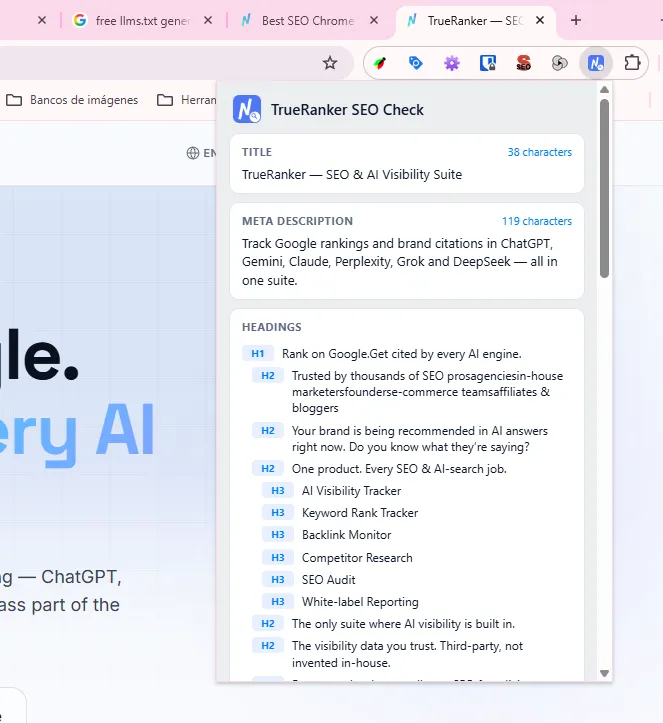
What it checks in one click:
- Instant On-Page Health Score (0–100): A quick weighted metric calculated on the fly that flags whether critical on-page fundamentals are missing.
- Title & Meta Description: Live character counts, pixel limits, and an interactive Google SERP preview so you can verify how the snippet renders on desktop and mobile.
- Heading Structure: Complete breakdown from H1 to H6. It immediately alerts you if a page is missing an H1 or if an accidental multi-H1 setup breaks the heading hierarchy.
- Technical Tags: Instant confirmation of canonical URLs, robots meta tags (
index/noindex,follow/nofollow), andhreflangalternate language tags. - Structured Data: Automatically detects and formats JSON-LD schema blocks, alerting you if the JSON is malformed or invalid.
- Image Diagnostics & Word Count: Scans images on the page to highlight missing
alttext and counts total content length.
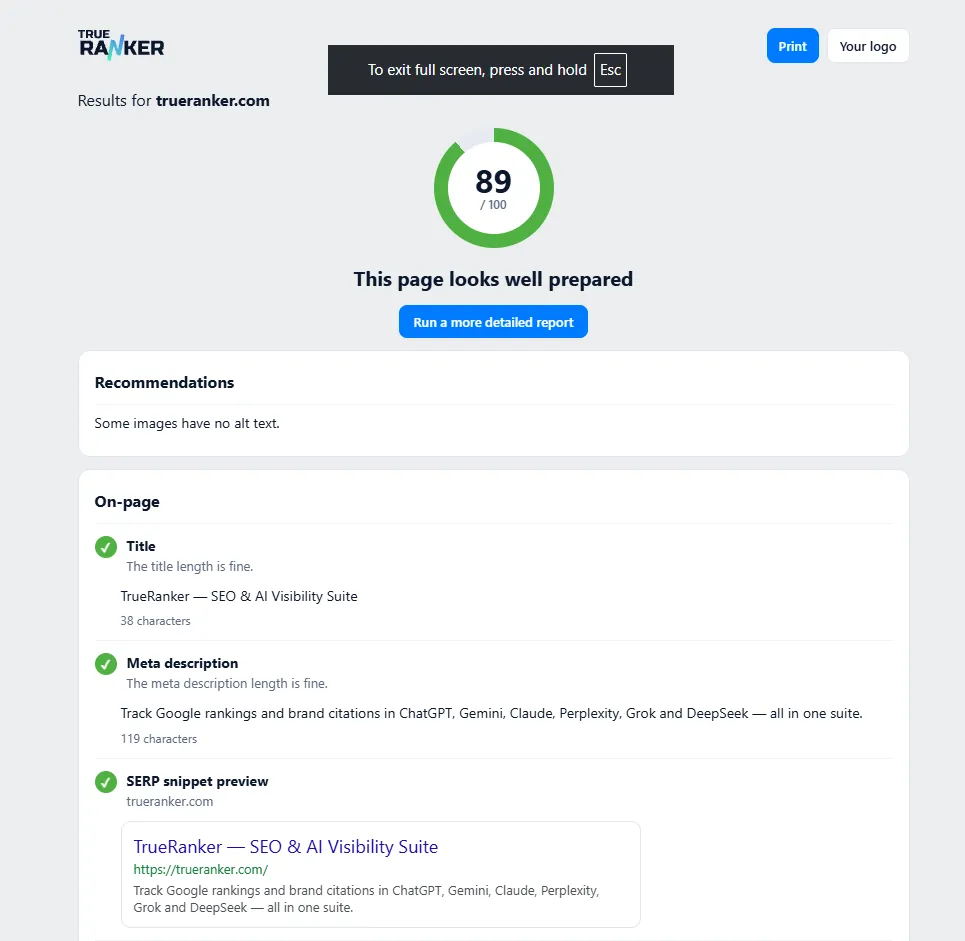
If you spot an issue you need to track over time, one button opens the full audit inside TrueRanker’s On-Page SEO Checker. If you are an agency consultant, you can enter your TrueRanker API key to customize reports with your own company logo.
- Price: 100% Free. Available on the Chrome Web Store.
- Best for: SEO consultants, web designers, and developers who need an instant, privacy-conscious on-page diagnosis before publishing.
2. Detailed SEO Extension: Deep on-page structural breakdown
Detailed SEO Extension by Glen Allsopp is one of the most widely respected SEO tools for Chrome, and for good reason. It provides a clean, tabbed overlay that breaks down the on-page architecture of any URL you browse.
Where TrueRanker SEO Check gives you a consolidated health score and privacy-first DOM audit, Detailed shines when you want to dive straight into a dedicated tab for schema or heading maps.
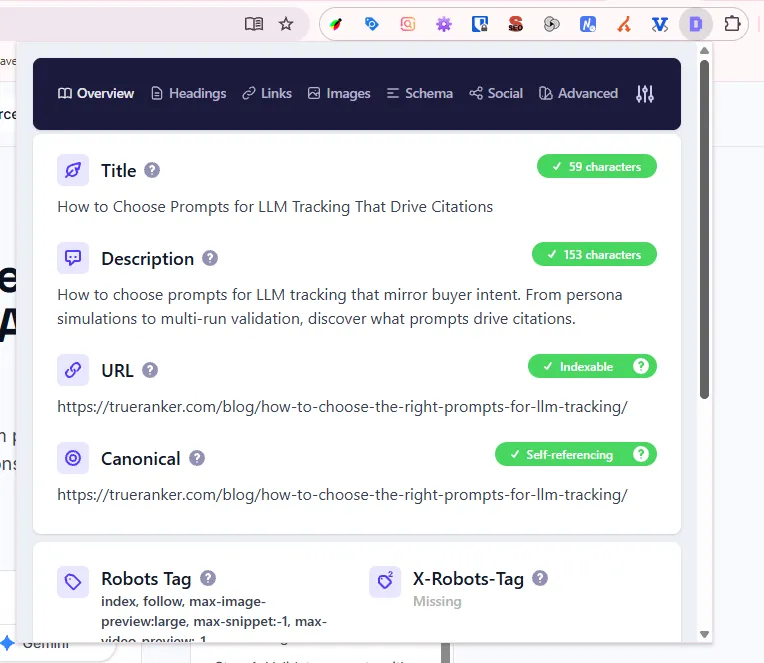
What I look at:
- Heading Map: It visualizes the entire outline of long-form articles so you can see if an H3 is nested under the wrong H2.
- Schema Tab: Lists all structured data types found on the page in a clean tree view.
- Quick Links Count: Totals internal and external links without opening DevTools.
What it won’t do: It doesn’t track keyword positions over time or tell you whether Google actually indexes those pages across international markets.
- Price: Free.
- Best for: Checking on-page tags and content outlines during competitor teardowns.
3. Redirect Path: Diagnose HTTP status codes and redirect chains
If you only install two extensions from this list, make this one of them. Built by Ayima, Redirect Path is the definitive Chrome SEO plugin for technical hygiene.
The extension icon sits quietly in your browser toolbar and changes color and number depending on the HTTP status code of the page you are on. If a page returns 200 OK, it shows a calm green flag. If you get caught in a 301, 302, 307, or 404, it immediately lights up in red.
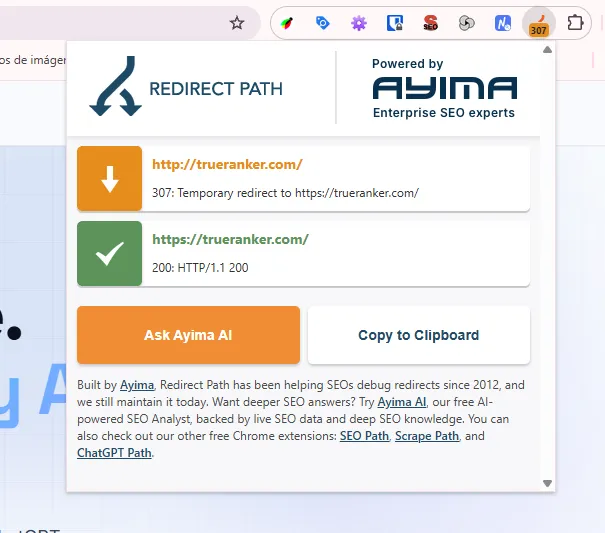
Why it is non-negotiable:
A few months ago, an agency asked me why their migrated collection URLs had lost 40% of their organic traffic. Visiting the page in Chrome looked completely normal. When I looked at Redirect Path, the URL was hopping through four intermediate hops: http → https non-www → https www with trailing slash → final landing page.
Every extra redirect hop introduces latency and risks search engines dropping the chain. Redirect Path flags:
-
301 and 302 redirects.
-
Meta refreshes and JavaScript-based redirects.
-
Server response headers (such as
x-robots-tagheaders, caching headers, and server types). -
Price: Free.
-
Best for: Technical site migrations, link audits, and spotting redirect loops.
4. View Rendered Source: Spot JavaScript SEO issues instantly
Modern websites are increasingly built on JavaScript frameworks like Next.js, Nuxt, React, or Angular. While Googlebot has improved dramatically at rendering client-side JavaScript, discrepancies between what the server delivers and what the browser renders remain one of the biggest causes of ranking drops.
View Rendered Source does one technical job better than anyone else: it displays a side-by-side comparison of:
- Raw HTML: The response returned by the web server before JavaScript runs.
- Rendered DOM: The final DOM state after your browser has executed JavaScript scripts.
- Difference: Highlighting exactly what JavaScript added, modified, or removed.
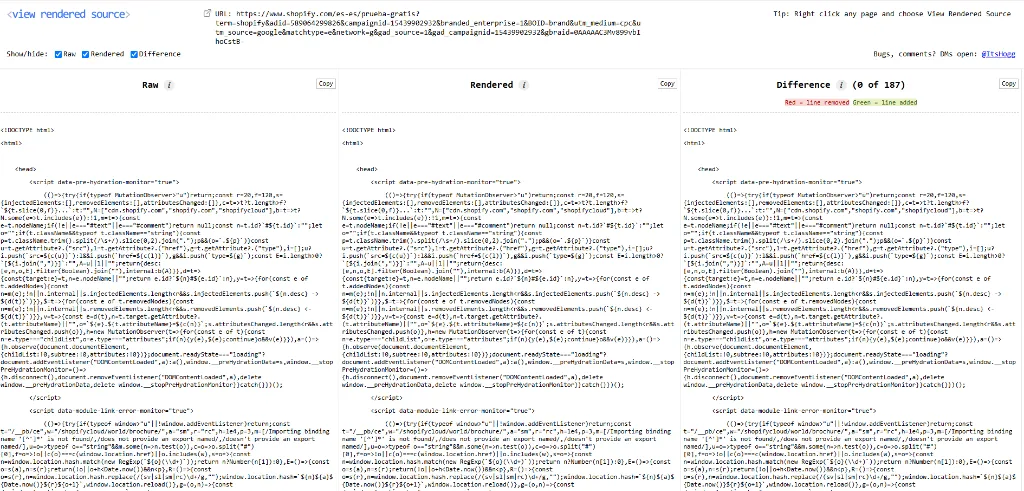
If your client’s React app injects canonical tags, meta robots, or internal links via client-side scripts that fail to execute in a headless crawler, this extension shows you the difference in green and red highlight.
- Price: Free.
- Best for: Technical SEO audits on JavaScript-heavy websites and single-page apps.
5. Keyword Surfer: Fast keyword ideas and search volume on Google
If you want search volume while searching on Google without logging into a massive dashboard, Keyword Surfer is a very convenient SEO extension for Chrome.
Whenever you submit a query on Google, Keyword Surfer overlays:
- Monthly search volume and estimated cost per click (CPC) directly inside the Google search box.
- A sidebar with related keyword ideas, similarity percentages, and search volumes.
- Estimated organic monthly traffic for each ranking domain on the SERP.
A real-world warning, though: Google’s recent search interface updates and continuous hydration frequently break in-SERP overlay extensions. You’ll often find the Keyword Surfer widget flickering or disappearing as the SERP finishes loading. When it works, it’s a great quick look; when Google tweaks its DOM, you will want a dedicated keyword research tool rather than relying on browser overlays.
- Price: Free.
- Best for: Copywriters and content marketers looking for instant keyword volume on the SERP.
6. SEO Search Simulator (by Nightwatch): Test unbiased local rankings globally
One of the biggest mistakes marketers make is testing rankings by typing keywords into Google in an incognito window. We explained why this fails in why incognito mode lies to you: Google still uses your IP address, localized data centers, and device fingerprint to bias the search results.
SEO Search Simulator by Nightwatch solves this directly in Chrome. It lets you simulate search queries from any country or language without requiring a paid VPN.
How I use it:
When verifying how a URL ranks in the United States while working from Spain or the UK, I select United States, enter the target query, and view the clean, unpersonalized SERP side by side with ranking position numbers.
It doesn’t track historical changes over 30 or 90 days—for that, you need a dedicated tool like TrueRanker’s rank tracker—but for a quick manual sanity check of an international SERP, it is invaluable.
- Price: Free.
- Best for: Checking global and local rankings without search history bias.
7. SimilarWeb: Traffic estimates and marketing channel breakdown
When doing competitor analysis or evaluating potential guest posting sites, you need a ballpark estimate of a website’s scale. Opening full analytics tools takes time; the SimilarWeb Chrome extension gives you that estimate in two clicks.
Key metrics displayed:
- Estimated Monthly Visits: Traffic trends over the last 6 months.
- Traffic by Country: Where the audience is geographically concentrated.
- Traffic Sources: The percentage of visits coming from Organic Search, Direct, Referrals, Social, and Paid Ads.
Keep in mind that SimilarWeb estimates small sites (under 50,000 visits/month) poorly because their panel data has low sample sizes for niche domains. For established competitors and mid-size publishers, however, the traffic channel distribution is very accurate.
- Price: Freemium (Free tier provides basic traffic overviews; paid tier requires an enterprise subscription).
- Best for: Quick competitor traffic benchmarking and link acquisition vetting.
8. Hunter.io: Email finder for link building and digital PR
Great SEO frequently requires outreach: pitching a digital PR story, requesting a link correction, or partnering with an industry blog. Hunting through footer menus and contact forms is slow.
The Hunter Chrome extension finds verified professional email addresses associated with the domain you are visiting.
What it shows:
- List of public email addresses linked to the domain.
- Department filters (Marketing, Editorial, Executive).
- Confidence scores indicating whether the email address has been verified against mail server records.
The free tier gives you 25 searches per month, which is more than enough for weekly spot checks on partner blogs.
- Price: Free (25 searches/month), with paid plans starting at $49/month for volume outreach.
- Best for: Digital PRs, link builders, and content creators looking for editorial contacts.
9. Racoon SEO Link Checker: Inspect link attributes and broken paths
Internal linking and link quality are core ranking factors. However, right-clicking “Inspect Element” on thirty links on a page to check whether an affiliate link has rel="sponsored" or whether an external link is set to nofollow takes forever.
Racoon SEO Link Checker (or classic alternatives like NoFollow / Check My Links) automates this visually:
- It highlights all links on the current page with distinct color borders:
- Green for internal follow links.
- Red or dashed lines for
nofollow,sponsored, orugcattributes.
- It checks link response codes on the page, highlighting broken links in red.
If you are auditing an affiliate site or making sure a guest post includes a clean, indexable follow link, this extension shows the answer without opening a single dev tab.
- Price: Free.
- Best for: Spotting nofollow tags, verifying sponsored disclosures, and finding broken links on resource pages.
10. Wappalyzer: Reveal CMS and underlying web technology
SEO is deeply intertwined with website infrastructure. If an e-commerce site is running on Shopify, your optimization playbook for URL structures and schema is very different from a custom WordPress installation or a headless WooCommerce setup.
Wappalyzer instantly uncovers the technologies running on any page you visit.
What it detects:
- Content Management System (CMS): WordPress, Webflow, Shopify, Magento, Ghost, Drupal.
- JavaScript Frameworks & Libraries: React, Vue, Next.js, Alpine.js.
- Analytics & Tracking Pixels: Google Analytics 4, Tag Manager, Hotjar, Segment.
- Hosting, CDN & Security: Cloudflare, AWS, Vercel, Fastly.
When on-boarding a new client or analyzing an outperforming competitor, one click tells you what stack they are building on.
- Price: Free tier available; paid plans for bulk technology lookups.
- Best for: Quick technical reconnaissance and client audits.
11. Ahrefs SEO Toolbar: In-SERP authority metrics for power users
If your agency already pays for an Ahrefs subscription, the Ahrefs SEO Toolbar is worth keeping installed.
While the free features include a respectable on-page summary and redirect tracer, the real power unlocks when you log into your Ahrefs account. The extension overlays Ahrefs metrics directly underneath every Google search result:
- Domain Rating (DR) and URL Rating (UR).
- Number of referring domains and total backlinks.
- Estimated organic search traffic and ranking keyword counts for the specific page.
If you don’t have an Ahrefs account, you won’t get the backlink metrics, making free tools like TrueRanker SEO Check and Redirect Path far better everyday choices. But for active Ahrefs users, having DR visible right on the SERP speeds up competitive research.
- Price: Free for basic on-page checks; requires paid Ahrefs plan ($119+/mo) for backlink and traffic overlays.
- Best for: SEO agencies and link builders who already subscribe to Ahrefs.
What about the other 30 extensions?
If you look at typical “top 40” articles, you’ll see tools like MozBar, SEOquake, Grammarly, Web Developer Toolbar, and Tag Assistant.
Here is why most of them didn’t make my daily pinned bar:
- SEOquake & MozBar: They were pioneering tools a decade ago, but today they often feel sluggish, clutter search results with intrusive toolbars, and constantly log out or demand captchas.
- Grammarly & general text checkers: Helpful for proofreading, but writing is not ranking. A spellchecker does not audit your canonicals, track your rankings, or measure whether search engines cite your brand.
- Heavy site crawlers: Extensions cannot crawl 10,000 URLs without crashing your browser tab. If you need a full site crawl, run a cloud-based free SEO audit or use dedicated desktop software like Screaming Frog.
My recommended 4-tool daily setup
If you want a blazing fast browser that covers 95% of daily SEO questions without eating your laptop’s battery, here is the exact combination I suggest keeping active:
- TrueRanker SEO Check: Click it on any URL for the instant on-page score, heading hierarchy, JSON-LD validation, and meta tag diagnostics (with zero privacy leaks).
- Redirect Path: Keep it running quietly in the background to catch multi-hop redirect chains and status code anomalies.
- Keyword Surfer: For quick search volume and query suggestions when researching terms directly in Google.
- View Rendered Source: Open it whenever you suspect client-side JavaScript is altering the DOM that Googlebot crawls.
Keep the rest disabled in Chrome’s extension manager and turn them on only when you need a specific task like outreach (Hunter) or tech stack profiling (Wappalyzer). Your browser will thank you.
Audit any URL in one click directly from your browser
Install TrueRanker SEO Check on Chrome, or try the full rank tracker and AI visibility suite free for 14 days.
Written by

Javier Quevedo
Co-Founder & CEO, SEO Lead
Javier co-founded TrueRanker and leads the frontend, the public website, and the last mile between a ranking in the database and the screen an SEO actually uses. He has spent years turning GEO, local SEO, on-page work and AI visibility into product — and into the guides on this blog — so agencies can measure ChatGPT citations the same way they already measure Google. He also works the backend: a clean interface over stale data is still a lie.
You might be interested
AI SEO tools: writing is not the same as measuring if they cite you
Some AI SEO tools draft, others audit, and almost none tell you if ChatGPT cites your site. Here are the ones I find most useful in each case.
Javier Quevedo9 min read
Read the postSEO tools: the kit that actually gets you found in Google
You want a list of SEO tools: names, what each one does, paid or free. I'll tell you which ten cover rankings, and how to see if ChatGPT names you.
Javier Quevedo10 min read
Read the post8 Best SE Ranking Alternatives in 2026 (AI Visibility Focus)
Looking for SE Ranking alternatives in 2026? Discover the top 8 tools to track your AI visibility and GEO metrics, led by TrueRanker.
Javier Quevedo7 min read
Read the post