Understanding Keywords
What are keywords in TrueRanker? How many keywords can you monitor?
Updated on
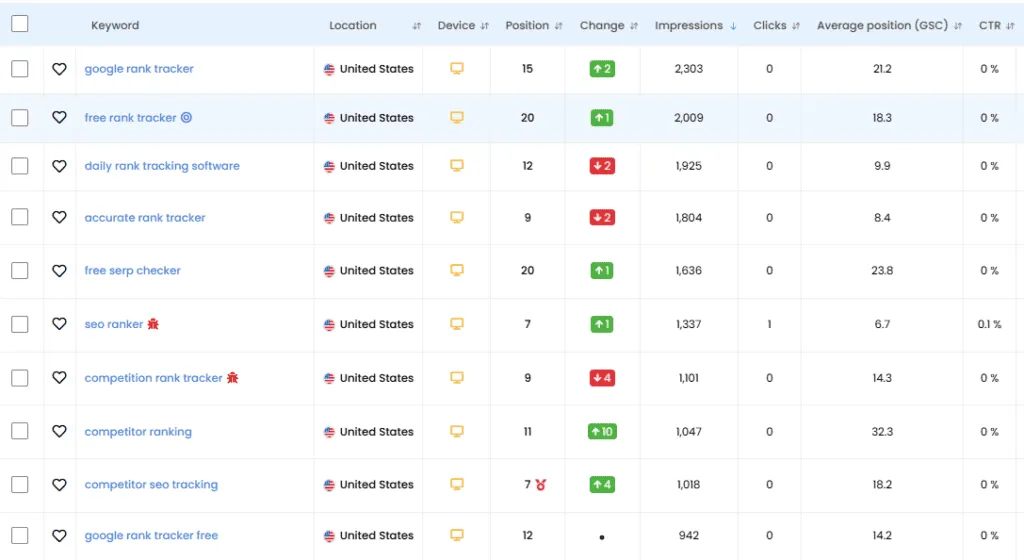
In TrueRanker, a Keyword is the combination of a search term + a specific location + a device.
We don’t just track “generic” positions; we track exactly what your users see when they search from their phones or computers in their specific city or country.
The 3 Pillars of a Keyword
Every keyword you track is defined by three parameters:
1. The Term
The exact phrase users type into Google (e.g., “best rank tracker” or “italian restaurant near me”).
2. The Location (Geo-Targeting)
Rankings change drastically depending on where the user is. TrueRanker allows you to track at different levels:
- Country: (e.g., United Kingdom).
- City/Region: (e.g., London, England).
- Zip Code: For hyper-local businesses.
3. The Device
Google uses different indexes for Desktop and Mobile.
- 📱 Mobile: Essential for local businesses (restaurants, services).
- 💻 Desktop: Crucial for B2B software and professional services.
4. The Position
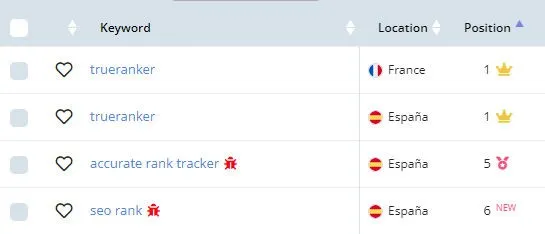
The “position” column indicates the position (obviously) of your project on the last day of the selected period.
In addition, it can be accompanied by several indicators:
- A crown: it appears when your project is in first organic position for the keyword.
- A medal: appears when your project is in the best position since you track it in TrueRanker. It is only displayed if you are monitoring the keyword for more than 7 days.
- The text “NEW”: is displayed when your project starts to rank for a new keyword in the top 100. In practice it is taken into account that, in the selected period, the first day is not ranking (101+) and the last one is.
Understanding the Metrics
Once your keywords are added, you will see several columns in your dashboard:
- Current Position: Where your website ranks today.
- Best Position: The highest rank you have ever achieved for this term.
- Volume: Estimated monthly searches for this keyword.
- CPC: Estimated Cost Per Click if you were to pay for Google Ads.
Ready to start tracking?
Now that you understand the basics, it’s time to populate your project. Remember, the sooner you add your keywords, the sooner our bots can start gathering historical data for you.