How to Deindex a Page from Google (Fast & Permanently) [2026]
Three ways to deindex a URL from Google: a temporary Search Console removal, a permanent noindex tag, or a 410 / login wall when it must never return.

It’s every SEO’s nightmare: You accidentally index a staging environment, a page with private customer data, or thin content that is hurting your overall rankings.
You need that page gone from Google search results, and you need it gone now.
In this guide, I’ll explain exactly how to deindex a URL effectively. We will cover the “Emergency Method” (for instant removal) and the “Permanent Method” (to keep it out forever).
When Should You Deindex a Page?
Before we start deleting, let’s make sure you actually want to deindex. Removing a URL from Google means zero organic traffic to that page.
You should unindex a page if:
- Privacy: It contains sensitive info (invoices, personal data).
- Thin Content: Pages with no value that dilute your site’s authority (tags, empty categories).
- Duplicate Content: This causes cannibalization. (Check our guide on how to detect SEO cannibalization before deleting anything!).
- Staging/Dev Sites: Test versions of your site that shouldn’t be public.
Method 1: The “Emergency Button” (Google Search Console)
If you need a page to disappear immediately (e.g., a data leak), use the Removals tool in GSC.
Warning: This is TEMPORARY. It only hides the URL for about 6 months. If you don’t fix the underlying issue (Method 2), it will come back.
- Go to Google Search Console.
- Click on Removals in the left sidebar.
- Click the red button “New Request”.
- Enter the exact URL you want to hide and select “Remove this URL only”.
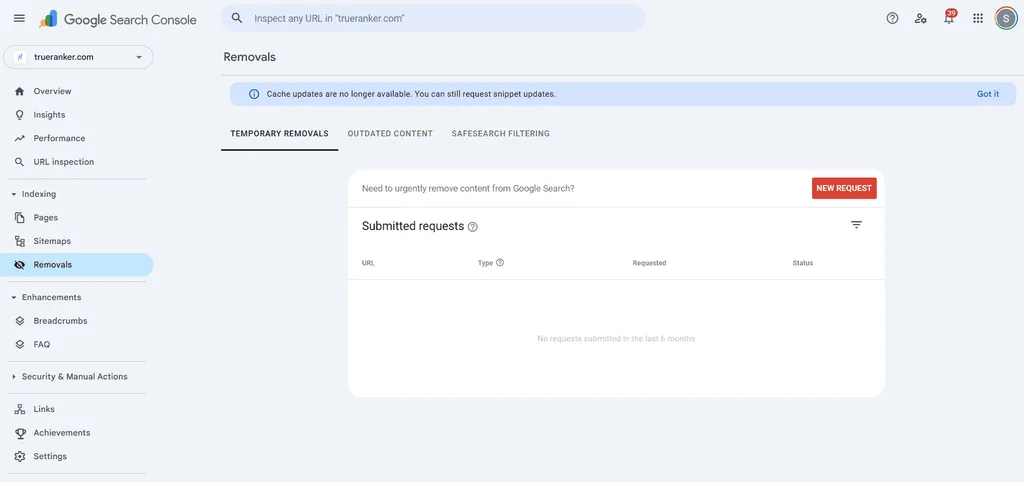
Google usually processes this within a few hours.
Method 2: The Permanent Fix (The “Noindex” Tag)
To tell Google “don’t ever show this page again,” you need to use the noindex meta tag. This is the correct way to deindex a page.
How to do it in WordPress (Yoast/RankMath)
You don’t need code.
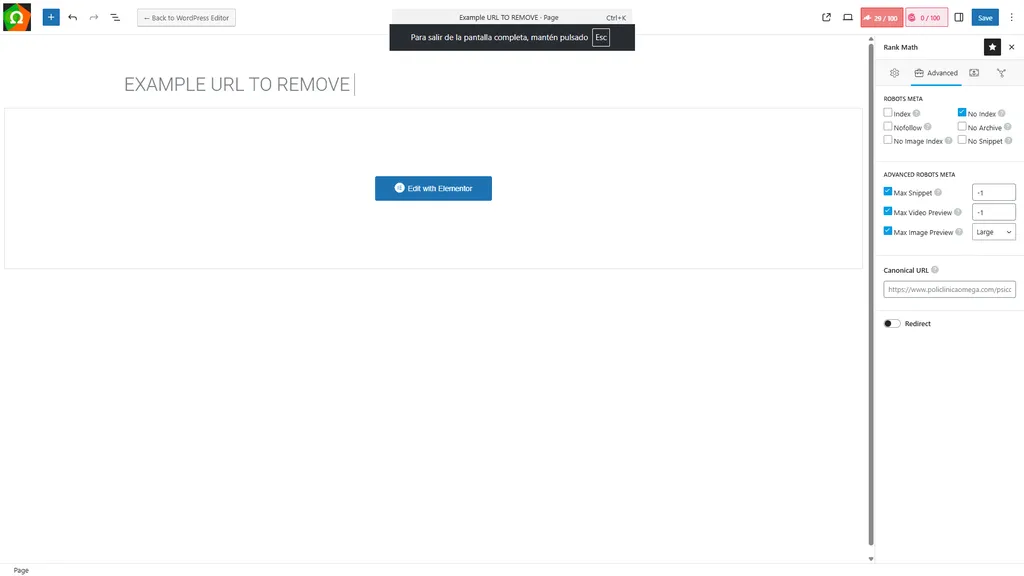
- Go to the page editor.
- Open your SEO plugin settings (Advanced section).
- Look for “Robots Meta” or “Index settings”.
- Select “No Index”.
How to do it with Code (HTML)
Add this line of code inside the <head> section of your page:
<meta name="robots" content="noindex, follow">Note: We usually keep “follow” so Google can still crawl the links on that page to other parts of your site.
Method 3: The “Nuclear Option” (410 or Password)
If the page never existed or you deleted it permanently:
- Status 410 (Gone): Better than a 404. It tells Google “this is gone forever, stop coming back.”
- Password Protection: Googlebot cannot crawl pages behind a login or password.
Common Mistake: Don’t Use robots.txt for Deindexing!
This is a classic SEO error. If you block a page in robots.txt (Disallow: /private-page/), Google cannot crawl it to see the “noindex” tag. Result: The page might still appear in search results, just without a description. Do not use robots.txt to deindex.
How to Verify the Page is Gone
After applying the changes, how do you know if it worked? Use the site: operator in Google.
Type site:yourdomain.com/exact-url-of-page in the search bar.
- If results appear: It’s still indexed.
- If “Your search did not match any documents”: Success! It’s deindexed.
Keep Your Site Clean
Deindexing bad pages is just as important as indexing good ones. A clean website structure helps your “money pages” rank higher.
Use TrueRanker to monitor your important keywords and ensure you haven’t accidentally deindexed a page that was bringing you traffic!
Is your SEO strategy working?
Stop guessing. Track your real rankings daily.
Written by

Javier Quevedo
Co-Founder & CEO, SEO Lead
Javier co-founded TrueRanker and leads the frontend, the public website, and the last mile between a ranking in the database and the screen an SEO actually uses. He has spent years turning GEO, local SEO, on-page work and AI visibility into product — and into the guides on this blog — so agencies can measure ChatGPT citations the same way they already measure Google. He also works the backend: a clean interface over stale data is still a lie.
You might be interested
How to Detect and Fix SEO Cannibalization (Real Case Study) [2026]
Are your pages competing on Google? Learn how to spot SEO cannibalization, set Target URLs, and reclaim your traffic with TrueRanker.
Javier Quevedo5 min read
Read the postHow to detect and fix 404 errors
A 404 error kills your rankings. Learn how to check for 404 errors using free tools, fix broken links, and recover your lost SEO traffic.
Sergio Pérez4 min read
Read the post