


Often, the worst enemy of your SEO strategy isn’t your competitor. It’s your own website.
Imagine you run an online store. You want your main category page (the money page) to rank for the keyword “running shoes.” However, Google decides that an old blog post from 2023 answers that search intent better.
Your blog post gets all the traffic, but nobody buys anything. Meanwhile, your actual sales page is buried on page 3.
This is SEO cannibalization: when two or more URLs from your own domain fight for the same keyword on Google. It confuses search engines, splits your link equity, and destroys your conversion rates.
In this guide, we are going to walk through a practical case study on how to spot this problem early and, most importantly, how to tell Google exactly which page should rank using TrueRanker’s keyword cannibalization tool.
The Big Myth: “Not all cannibalization is bad”
Most generic SEO tools simply scream “Danger!” the moment they see two of your URLs ranking for the same term.
But the reality of the SERPs is different. If you have two results on the first page of Google for the same keyword (SERP dominance), and your main sales page is ranking above the secondary page, that is fantastic. You are hoarding clicks.
The real problem arises when the wrong URL is winning. You need to manage search intent, not just blindly delete pages.
Real Case Study: Plugging Money Leaks with TrueRanker
Let’s look at how to fix this step-by-step using a real project.
Step 1: Spotting the Conflict (The Bugs)
When tracking your keywords in TrueRanker, the system cross-references the data daily. If it detects that more than one URL is ranking for the same term, a visual alert triggers.
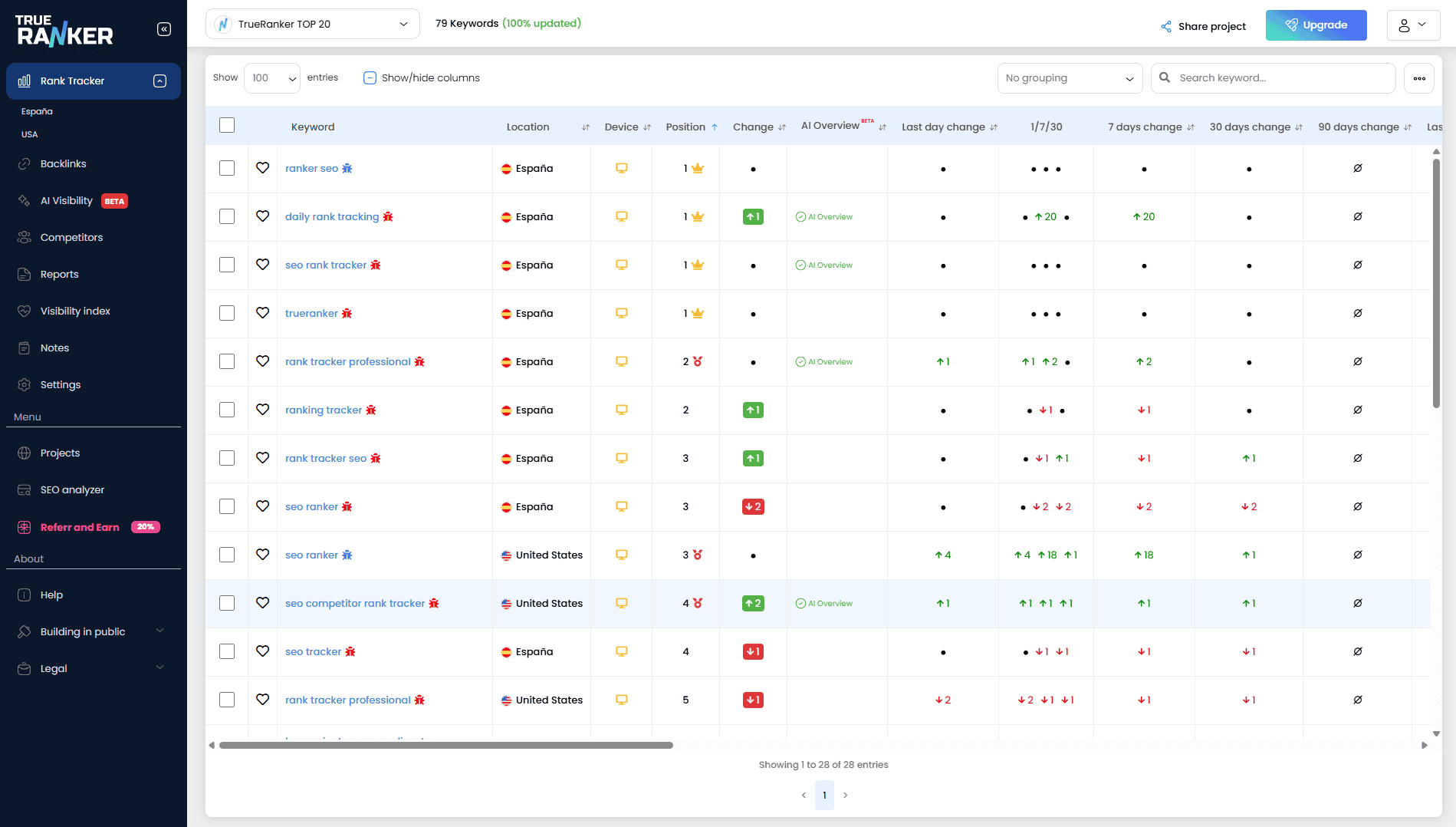
Look at the colored icons next to the keyword. This is where TrueRanker changes the game:
- 🐞 The Red Bug (Critical): You have cannibalization, and your desired Target URL is NOT the winner. You are losing traffic to the wrong page.
- 🐞 The Blue Bug (Safe): Multiple pages are ranking, but your Target URL is #1. You are safely dominating the results.
- 🎯 The Blue Target (Perfect): Mission accomplished. Your Target URL is ranking alone with no conflicts.
Step 2: The Game Changer: Setting a “Target URL”
For the system to know if a cannibalization issue is “Good” (Blue) or “Bad” (Red), you must explicitly tell it which page you actually want to rank.
- Click on any keyword that has a conflict (e.g., “seo ranker”).
- In the detail view, locate the URL that should be winning.
- Click the “Target Button” (the crosshair icon) or paste the preferred URL manually in the top right corner.
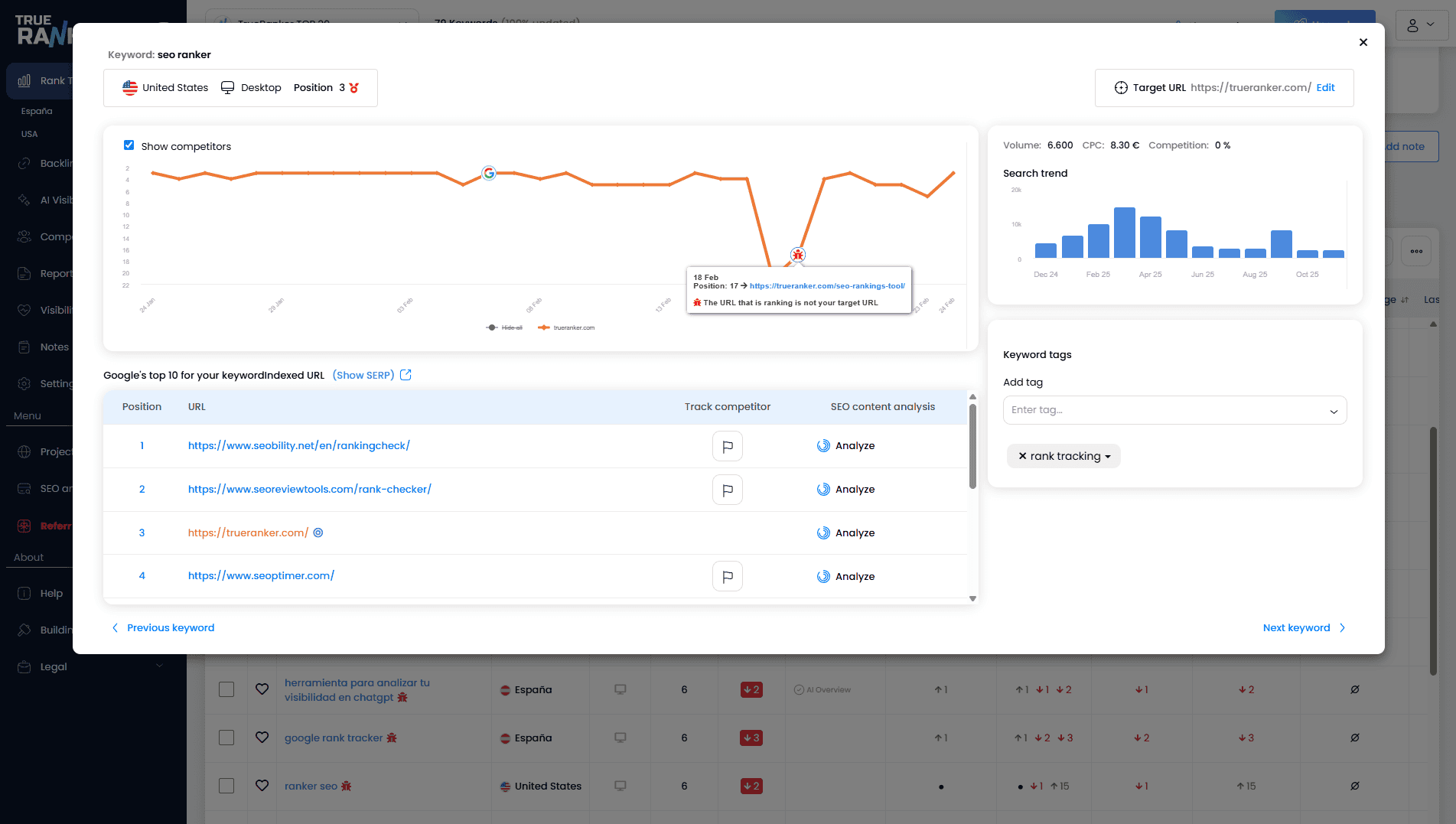
As you can see in the image above, we defined our Target URL (the homepage). However, the chart throws a Red Bug warning because an internal URL (/seo-rankings-tool/) has sneaked into the SERPs, dropping our real position. Time to fix it!
Step 3: Focus on What Matters (Filters for Pros)
If you manage a massive site with thousands of keywords, you can’t scroll through everything.
Simply go to the Cannibalizations filter dropdown and select “Target URL is not ranking higher”. It instantly hides the “safe” stuff and shows you only the urgent, money-leaking problems where your strategy is failing.
How to Fix SEO Cannibalization Once Detected
Once TrueRanker reveals a Red Bug, you have 4 main ways to resolve it:
- 301 Redirect: If the “intruder” page brings no unique value or traffic from other terms, delete it and redirect (301) it to your Target URL to pass on its authority.
- Canonical Tag: If you must keep both pages live, add a
rel="canonical"tag to the secondary page pointing to your Target URL. - De-optimization: Remove the exact match keyword from the H1, Title tag, and meta description of the intruder page. Shift its focus to a long-tail variant.
- Internal Linking: Go to the competing page and add a dofollow link with exact match anchor text pointing directly to your Target URL, signaling priority to Google.
Conclusion: Stop Guessing
The goal of SEO isn’t always to kill every cannibalization blindly, but to ensure that the page you want is the one winning. Check out all the features of the SEO cannibalization detector.
Take a few minutes today to define your Target URLs for your most critical keywords. You will see your strategy click into place.